YouTube Crochet Inspirations: Channels to Follow

Recently I have been watching more and more crochet market vlogs and crochet studio vlogs. But let’s backtrack to the beginning of this year in January. I was asked, along with other small business owners, to apply to sell our items in their cafe shop. I had sold my items there before so I gladly said yes. Several day went by and I had started to make some inventory because I didn’t have anything. I don’t normally sell my items in my Etsy shop so I didn’t have anything made. So I frantically started crocheting bubble tea keychains. I also started going on line for more ideas. I’m not sure how I came across it but I happened upon someone who made something with chunkier yarns. In the past I stayed away from these because they were very expensive. They cost twice or three times as much as Red Heart Super Saver. Many times I would buy Red Heart on sale and it was a great deal.

So I finally caved and ordered several skeins of Premier Parfait Chunky. They were so soft and amazing to crochet with but I went through them very fast. I also tried out Bernat Blanket. Oh and to finish my story about the cafe shop, I was turned down so I had this extra inventory I had to sell. I also bought so much extra yarn. I wanted to make my money back so I decided to make more dolls to recoup my losses. I was planning on doing a market this year, sometime in the Fall or Winter but I already spent so much on yarn that I didn’t have enough to get packaging, a tent, display items and other things I needed to make my booth look nice. Meanwhile I started watching market videos on YouTube. I had seen one crocheter (madewithapril) make crocheted flowers and I thought I would try to attempt it. Crochet flowers were actually the ones I wanted to initially make for the cafe. I bought the wire and everything. So now I’m left with a whole bunch of wire that I have to use. Crocheting flowers is pretty easy but taxing on my hands. I only created a few. I might make more in the future but my 41 year old hands need a rest.

So I continued to grow my inventory and started watching market videos/vlogs. From Instagram, I found madewithapril. Her video style is so down-to-earth that I continued watching her other videos as well. Then I went on to watch many other videos from amazing YouTubers who don’t get quite as many subs and views as they should. Here I want to list the YouTubers I really enjoyed watching. They’re videos are so informative and friendly. They’re cozy vibes really makes them a wonder to watch and listen to.

I want to start with Made With April. She’s already got quite a following and her videos are amazing. I posted all the channels below. Just click on the image to go to their YouTube page.

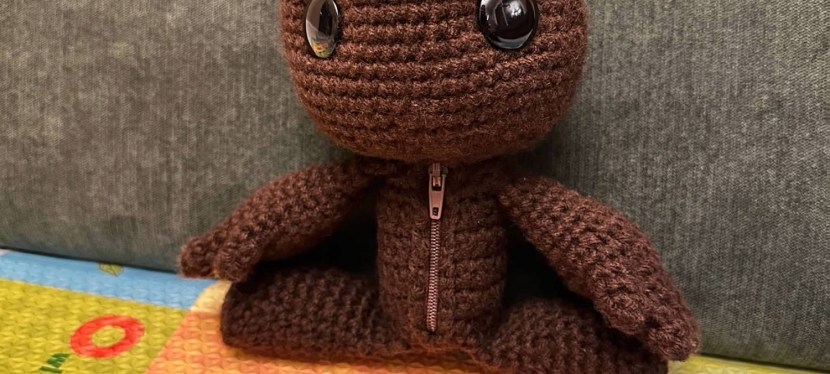
How to Crochet a Sackboy: Step-by-Step Guide

Key:

Rnd – Round
FO – Finish Off
St – Stitch
Sc – Single Crochet
Inc – Increase meaning 2sc in one stitch
Dec – Decrease meaning crocheting 2 stitches together
BLO – Back Loop Only

Materials:

  1. 1 skein of medium worsted yarn. I used Red Heart Super Saver in Coffee.
  2. 4mm hook. I used the Tulip brand.
  3. Darning needle. I used Clover Chibi.
  4. Scissors. I used two kinds, one for the yarn and a sturdy large one for the zipper.
  5. A zipper of your choice. I got mine off of Amazon.
  6. Black shank buttons.
  7. Thread to help you put yarn through the back of the buttons

Head:

Rnd 1. 6sc in magic circle. (6)
Rnd 2. Inc x 6. (12)
Rnd 3. (1sc. Inc.) x 6. (18)
Rnd 4. (2sc. Inc.) x 6. (24)
Rnd 5. (3sc. Inc.) x 6. (30)
Rnd 6. (4sc. Inc.) x 6. (36)
Rnd 7. (5sc. Inc.) x 6. (42)
Rnd 8. (6sc. Inc.) x 6. (48)
Rnd 9. BLO. 48sc. (48)
Rnd 10-14. 48sc. (48)
Rnd 15. (7sc. Inc.) x 6. (54)
Rnd 16-19. 54sc. (54)
Rnd 20. (2sc. Dec.) x 13. 2sc. (41)
Rnd 21. (1sc. Dec.) x 13. 2sc. (28)
Rnd 22. (1sc. Dec.) x 9. 1sc. (19)
Rnd 23. (1sc. Dec.) x 6. 1sc. (13)
Rnd 24. 12sc. We are skipping the last stitch. (12)
Rnd 25. Chain 1. Inc x 12. (24)
Rnd 26-32. Chain 1. 24sc. (24)
Rnd 33. Chain 1. (7sc. Inc.) x 3. (27)
Rnd. 34-36. Chain 1. 27sc. (27)

At this point sew the zipper on. Make sure that your zipper is the right size. If it’s not the right size, cut it shorter. I used a backstitch to sew it on.

Rnd 37. BLO. Dec x 13. 1sc. (15)
Rnd 38. Dec x 7. 1sc (9)
Rnd 39. Dec x 3. (6)

Finish off here and sew any gap closed. Weave in the ends.

Hands (make 2):

Start with the fingers. There will be 10 fingers in total. The thumb will be 1 row less than the rest of the fingers.

Rnd 1. 4sc in magic circle. (4)
Rnd 2-5. 4sc. (4)

Finish off for the first 3 fingers. Do not finish off for the fourth finger because you will continue to crochet onto the other fingers from here. Please watch the video for more clarity. Take any finger and crochet 2sc. Then take another finger and crochet 2sc. Take the last finger and crochet 4sc. Then continue onto the next finger as you crochet around the hand. Crochet into the next 6sc. You should have a total of 16 stitches. This is Rnd 6. Place a marker here.

Rnd 7. 16sc. (16)
Rnd 8. This is where you connect the thumb. The thumb is the same as the other fingers but with one less row. Continue to crochet onto the thumb with 4sc. You should have a total of 20sc. Do 1sc to completely join the thumb. Add a marker here.
Rnd 9. 20sc.
Rnd 10. 20sc.
Rnd 11. (2sc. Dec.) x 5. (15)
Rnd 12. (3sc. Dec.) x 3. (12)
Rnd 13-19. 12sc. (12)

Stuff the arm. Flatten the arm. See what this looks like in the video. Crochet both layers together. Chain 1. 6sc. FO. Then sew the arm onto the body with a whip stitch at Rnd 24 of the head/body. Position the arm about 3 stitches away from the zipper.

Leg (make 2):

Rnd 1. 8sc in magic circle. (8)
Rnd 2. Inc x 8. (16)
Rnd 3. BLO. 16sc. (16)
Rnd 4-8. 16sc. (16)
Rnd 9. (6sc. Dec.) x 2. (14)
Rnd 10-13. 14sc. (14)

Stuff the leg. Flatten the leg like you did with the arm. Chain 1. 7sc through both layers. FO and sew onto the body. Sew the leg on the BLO row of the body at the bottom. Make sure that the leg lines up with the arm.

For the eyes, please see the video for clearer instructions. Position the middle of the buttons 10-11 stitches apart. Insert them between Rnds 14 and 15 of the head. The total height of your doll is approximately 9.5 inches.

Keurig K475 from Influenster

IMG_0169

Recently I received a huge box from Influenster. I hadn’t been doing Influenster for a while but since I’m not too busy at the moment, I decided to start up again. I got this voxbox today and was surprised to see so many items in the box. I actually got the email a couple of days ago and was really excited to be able to test the Keurig K475. My fiance and I are big coffee drinkers and this is perfect because we were actually looking to buy a coffee maker and now we don’t have to.

IMG_0171

So below is my unboxing of the Keurig and it’s accessories. There will definitely be a review to follow this pretty soon. I will also try to do a video for those of you who haven’t used a Keurig before. We will probably set it up tonight and film so I can post it for you guys.

Note: I received these products complimentary from Influenster for testing purposes.

5 Tips for making a good YouTube video

I’ve been doing YouTube videos for about 6 years now and I don’t claim to be an expert but I’ve been a viewer too and have seen difficult-to-watch videos on YouTube. I’ve also been trying to upgrade my videos but it costs money to do so. Sometime ago in 2010, YouTube gifted the top 500 YouTubers with $1,000 to buy better gear to improve their videos. This was their Christmas gift to them and I remember seeing this and thinking that it wasn’t fair that the top YouTubers got this money when other beginning YouTubers are struggling to improve their videos. A camcorder, a good mic, good lighting and the other extras cost a lot of money. The top YouTubers already make tons of money. I don’t get why YouTube doesn’t reward struggling YouTubers with gear. It should have been some sort of contest of some sort, but what do I know. I’m just a struggling YouTuber. But, I digress….

So, here are some tips to make good YouTube videos:

1. Mix, dissolve or crossfade

I’ve seen many a YouTube video that does this the wrong way. I’ve also been guilty doing this when I first started making videos. When you choose this transition you run the risk of not being able to be understood properly. This might turn off your audience. The audio from the last seconds of the clip will mesh with the audio at the beginning of the second clip. Try to space out your clips with some bits of silence at the end and at the beginning of clips if you want to use this transition type.

2. Background music

Sometimes the music can be louder than your voice. This is a common mistake among YouTube videos. It’s distracting and a little bit annoying when you have to lower the volume every time the talking stops and the music begins. In one video I watched the music was so distracting I switched to another one. Try to make the volume of your voice the same as your music. You can do this by using Audacity which you can download for free on sourceforge: Audacity. This application allows you to change the volume of your music to fit your audio. It can also change pitch and allow you to record.

3. Choosing a good mic

Choose a good mic if you want high quality audio. It’s hard to find a good affordable mic. Many of the good ones are over $100. If you are going to film outside it is best to invest in a good mic because the wind is distracting. Some may even stop watching your video because the wind does overpower your audio.

4. Talking speed

Try to speak normally but also try not to speak too fast. Pretend your’re talking to a friend and you’re trying to explain something or teach something. There was one video I was watching with my mom with a girl who was teaching us how to cook macarons. She was speaking so fast. Kinda like how I think a chipmunk would speak if it was given caffeine. That’s just way too fast. You would have to pause the video multiple times to even get the recipe or the ingredients she was using. Speak at a normal speed and enunciate your words. I know I have some trouble with this sometimes. I need to make sure my point gets across by making my words clear.

5. Video editing software

Find a good one that will make your videos properly. When I was using my mac I used iMovie and Final Cut. Those were by far the best video editing software I have used. My videos are clean without pixelation. I have Windows 10 right now which I don’t recommend you upgrade to btw. Windows 10 doesn’t support Windows Movie Maker. Now, I’ve used Window Movie Maker before with an older PC and that worked fine. I had to download Windows Movie Maker onto my fiance’s computer and it didn’t do a good job. It was pixelating random clips which was not suppose to happen. It didn’t pixelate when I published it as a movie for my PC but it didn’t want to publish correctly for HD movies. That really pissed me off. I did some troubleshooting of my own and it still didn’t want to do it right. For tutorials I need my videos to by in HD so you guys can see it better. I ended up using YouTube video editor which is fine if you have nothing else. It’s not great because what takes 30 minutes to edit, YouTube video editor will turn it into 1 to 1.5 hours. I just don’t like using it but what can I do. I have nothing else to use. I tried to use wevideo but it adds a huge logo on the top part of your video. Not cool. If you guys have any suggestions please let me know.

If you want to edit videos through YouTube all you have to do is upload all of the clips you want to include in your video. Then go here: YouTube Video Editor. Here you can select your clips and start editing. The one thing that is horrible about this (there are a few other horrible things but here’s one pretty bad one) is that you can’t add your own audio without replacing your ENTIRE audio. That irritated me. So you would have to upload that clip you want the audio to be at and upload it again. Ridiculous. So if you have to use this like me, I wish you luck and all the patience in the world because you’re gonna need it.

So that’s pretty much all of the tips I have. Let me know if you guys have any questions 🙂